08.19 React 학습하기
08.19 React 학습하기
React 앱은 컴포넌트로 구성된다.
컴포넌트?
고유한 로직과 모양을 가진 사용자 인터페이스(UI)의 일부다.
1
2
3
4
5
6
7
8
9
10
11
12
13
14
15
16
function MyButton() {
  return (
    <button>
      I'm a button
    </button>
  );
}

export default function MyApp() {
  return (
    <div>
      <h1>Welcome to my app</h1>
      <MyButton />
    </div>
  );
}
<MyButton /> 이 대문자로 시작한다. React 컴포넌트는 항상 대문자로 시작하고 HTML 태그는 소문자로 작성한다.
export default 키워드는 파일의 기본 컴포넌트를 지정
useState
useState로부터 현재 State (count)와 이를 업데이트할 수 있는 함수 (setCount)를 얻을 수 있다. 어떤 이름으로도 지정할 수 있지만 [something, setSomething]으로 작성하는 것이 일반적이다.
1
2
3
4
5
6
7
8
9
10
11
12
13
function MyButton() {
  const [count, setCount] = useState(0);

  function handleClick() {
    setCount(count + 1);
  }

  return (
    <button onClick={handleClick}>
      Clicked {count} times
    </button>
  );
}
useState(0)으로 세팅했기 때문에, 0으로 초기화 된다.
Hook 사용하기
use로 시작하는 함수를 Hook 이라고 한다. Hook은 다른 함수보다 제한적이다. 컴포넌트(또는 다른 Hook)의 상단에서만 Hook을 호출할 수 있다. 조건이나 반복에서 useState를 사용하고 싶으면 새 컴포넌트를 추출해서 넣는다.
컴포넌트 간에 데이터 공유하기
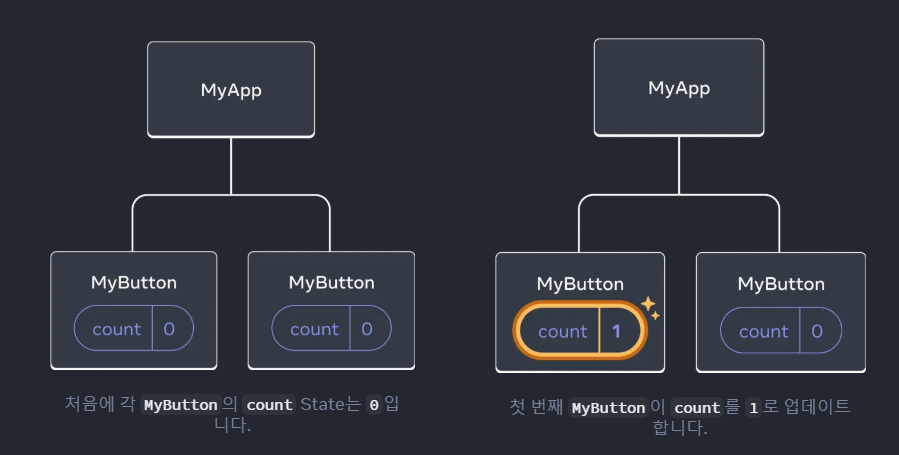 독립적인 버튼의 count가 올라가고 있다. 두 컴포넌트가 동일한 count를 표시하고 함께 업데이트 하려면, State를 개별 버튼에서 모든 버튼이 포함된 가장 가까운 컴포넌트 위쪽으로 이동해야 한다.
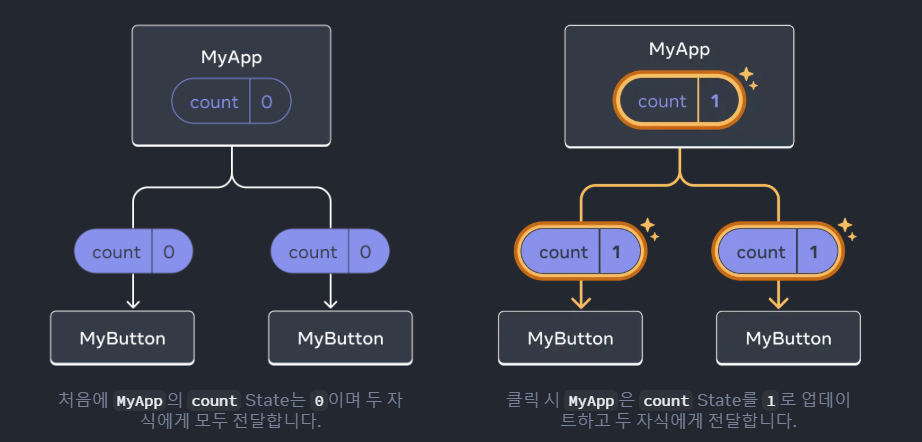
1
2
3
4
5
6
7
8
9
10
11
12
13
14
15
16
17
18
19
20
21
22
23
24
25
import { useState } from 'react';

export default function MyApp() {
  const [count, setCount] = useState(0);

  function handleClick() {
    setCount(count + 1);
  }

  return (
    <div>
      <h1>Counters that update together</h1>
      <MyButton count={count} onClick={handleClick} />
      <MyButton count={count} onClick={handleClick} />
    </div>
  );
}

function MyButton({ count, onClick }) {
  return (
    <button onClick={onClick}>
      Clicked {count} times
    </button>
  );
}
This post is licensed under CC BY 4.0 by the author.